
海报设计
Using REFERENCE_0 as the base style and preserving the central chicken illustration, trans
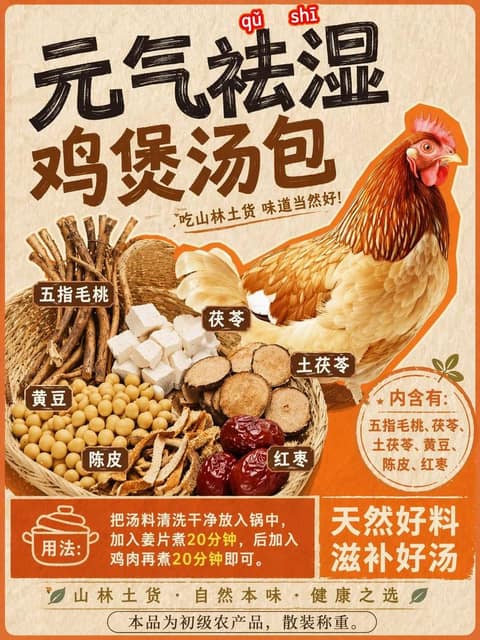
提示词
Using REFERENCE_0 as the base style and preserving the central chicken illustration, transform the image into a product packaging label for a herbal soup mix. Shift the chicken to the right side. Replace the top text with a large, bold black brush-stroke headline {argument name="main headline" default="元气祛湿 鸡煲汤包"} and a smaller subtitle {argument name="subtitle" default="吃山林土货 味道当然好!"}. On the left side, add a new woven basket containing exactly 6 distinct piles of ingredients: woody root sticks, white square cubes, round sliced brown roots, yellow soybeans, dried orange peel strips, and dark red dates. Attach 6 small brown rectangular labels with white text to these ingredients. Below the chicken, add a circular orange badge containing the text {argument name="ingredients list" default="内含有:五指毛桃、茯苓、土茯苓、黄豆、陈皮、红枣"}. At the bottom, create a solid orange rectangular banner featuring a cooking pot icon, the text {argument name="usage instructions" default="用法:把汤料清洗干净放入锅中,加入姜片煮20分钟,后加入鸡肉再煮20分钟即可。"}, and a secondary slogan {argument name="bottom slogan" default="天然好料 滋补好汤"}.
常见问题
海报设计案例适合什么模型?
这条提示词主要面向 GPT Image 2,也可按效果迁移到同类图像模型。完整提示词可在 craftprompt.vip 复制。
使用「海报设计案例」需要参考图吗?
需要。请先准备风格或主体参考图,再粘贴提示词生成,效果更稳定。
如何用「海报设计案例」生成海报?
复制提示词 → 选择合适模型并上传参考图 → 在 craftprompt 生图工作台生成。