
图像模板 - 游戏截图/UI
game-ui, mmo, hud, ancient-china, open-world, cinematic, wuxia, 图像生成, gpt-image-2, Game UI
提示词
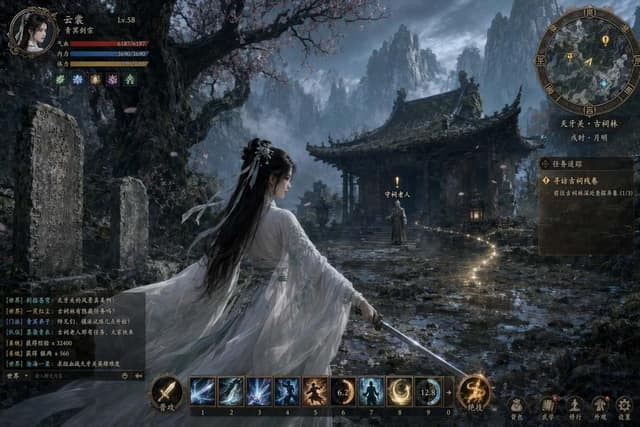
A full-screen in-game HUD screenshot of a AAA ancient-China open-world MMO, rendered in the cinematic photoreal style of Black Myth: Wukong — Unreal Engine 5 level lighting, volumetric god rays, deep filmic color grading, subtle chromatic aberration, shallow depth of field on the background, razor-sharp foreground.

# 3D scene (underneath the UI)
- Center of frame: {argument name="protagonist" default="a beautiful Chinese female swordswoman in her mid 20s, flowing ivory-white Hanfu robe with pale jade embroidery, long black hair tied with a silk ribbon, jade hairpin, elegant calm expression, holding a slender straight jian sword in a low guard stance, gentle wind lifting her sleeves and hair ribbon"}, captured in a cinematic third-person over-the-shoulder framing, shot from slightly behind and above her right shoulder so the viewer sees both her profile and the world ahead.
- Environment: {argument name="environment" default="a cold-toned deep-mountain ancient shrine — towering weathered stone steles carved with faded sutras, a half-ruined Tang-dynasty wooden pavilion with curled eaves and peeling vermilion paint, a massive ancient gnarled peach tree with scattered falling petals, dense low-lying mist rolling along mossy stone steps, distant jagged mountain peaks fading into cold blue fog"}.
- Lighting: cold teal and desaturated blue base palette with warm amber rim light on the protagonist, faint god rays cutting through the mist, cinematic HDR contrast, filmic grain.

# HUD overlay (drawn cleanly on top of the 3D scene, readable, game-screenshot accurate)
- Top-left — Character status panel:
  - Circular portrait frame with ornate bronze Chinese cloud-pattern border, inside a stylized portrait of the same protagonist.
  - To the right of the portrait: character name "{argument name="character_name" default="云裳"}", level badge "Lv.{argument name="level" default="58"}", and a small sect crest tag "{argument name="sect" default="青冥剑宗"}" (Qingming Sword Sect).
  - Three stacked bars beneath: red HP bar labeled "气血", blue MP/internal-energy bar labeled "内力", yellow stamina bar labeled "体力". Each bar has crisp numeric readouts in small Song/serif Chinese typography.
  - A row of 5 small buff/debuff icons with faint Chinese seal-script labels and countdown timers.
- Top-right — Minimap:
  - Round minimap with a brass compass-style frame etched with the 8 trigrams (bagua) around the rim, N/E/S/W marked in small seal-script characters.
  - Inside: a semi-transparent top-down terrain painted in ink-wash style, the player shown as a golden arrow in the center, nearby quest markers as yellow exclamation marks, a blue diamond waypoint, and a red skull for an elite monster.
  - Below the minimap: current region name "{argument name="region" default="天牙关 · 古祠林"}" and in-game time "{argument name="in_game_time" default="戌时 · 月明"}" in vertical Song typography.
- Right edge — Quest tracker panel:
  - Semi-transparent parchment-textured vertical panel with faint ink-wash border.
  - Header: "任务追踪" in bold Song typography.
  - Active quest: "{argument name="active_quest" default="寻访古祠残卷"}" with a short one-line objective beneath in smaller type, e.g. "前往古祠林深处查探异象 (1/3)".
  - Two additional quest entries listed below in dimmer color, each with a small circular category icon (main / side / sect).
- Bottom-center — Skill hotbar:
  - 10 square skill slots arranged horizontally, each with an ornate bronze Chinese-motif border and a dark inner background.
  - Each slot contains a painterly skill icon with a recognizable wuxia theme (sword qi arc, swirling internal-energy palm, stepping-on-snow lightfoot, ink-bird summon, ice-lotus burst, etc.).
  - Hotkey letters 1-0 in small crisp white numerals at the bottom-right of each slot.
  - Two skills are on cooldown with a faint radial sweep overlay and a small remaining-seconds number.
  - Flanking the hotbar on the left: a round "普攻" basic-attack button; on the right: a round "绝技" ultimate button with a
常见问题
古祠林适合什么模型?
这条提示词主要面向 GPT Image 2,也可按效果迁移到同类图像模型。完整提示词可在 craftprompt.vip 复制。
如何用「古祠林」生成UI界面?
复制提示词 → 选择合适模型 → 在 craftprompt 生图工作台生成。