
玻璃材质重渲染
Upload an image as the basis for retexturing. Use GPT image 2 (not Sora).
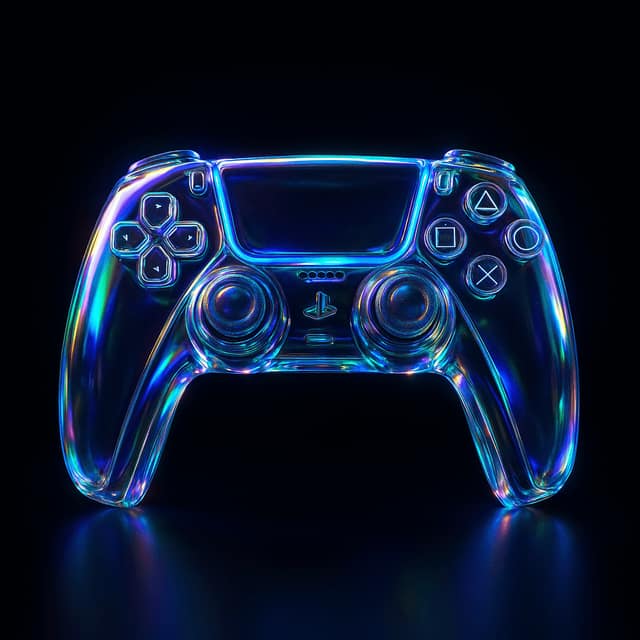
提示词
Retexture the reference image based on the JSON aesthetic definition below
{
  "style": "photorealistic 3D render",
  "material": "glass with transparent and iridescent effects",
  "surface_texture": "smooth, polished with subtle reflections and refractive effects",
  "lighting": {
    "type": "studio HDRI",
    "intensity": "high",
    "direction": "angled top-left key light and ambient fill",
    "accent_colors": ["blue", "green", "purple"],
    "reflections": true,
    "refractions": true,
    "dispersion_effects": true,
    "bloom": true
  },
  "color_scheme": {
    "primary": "transparent with iridescent blue, green, and purple hues",
    "secondary": "crystal-clear with subtle chromatic shifts",
    "highlights": "soft, glowing accents reflecting rainbow-like effects",
    "rim_light": "soft reflective light around edges"
  },
  "background": {
    "color": "black",
    "vignette": true,
    "texture": "none"
  },
  "post_processing": {
    "chromatic_aberration": true,
    "glow": true,
    "high_contrast": true,
    "sharp_details": true
  }
}
常见问题
玻璃材质重渲染适合什么模型?
这条提示词主要面向 GPT Image 2,也可按效果迁移到同类图像模型。完整提示词可在 craftprompt.vip 复制。
使用「玻璃材质重渲染」需要参考图吗?
需要。请先准备风格或主体参考图,再粘贴提示词生成,效果更稳定。
如何用「玻璃材质重渲染」生成AI绘图?
复制提示词 → 选择合适模型并上传参考图 → 在 craftprompt 生图工作台生成。