
橡皮章旅行田野笔记海报
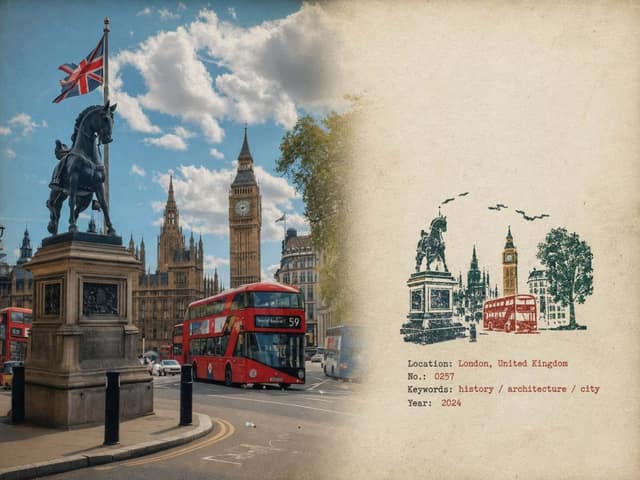
Rubber Stamp Travel Field Notes Poster — Natural Realism Version Create a separate “Rubber
提示词
Rubber Stamp Travel Field Notes Poster — Natural Realism Version

Create a separate “Rubber Stamp Travel Field Notes Poster” for each photo I upload. Output each photo individually. Never create a collage or combine multiple photos.

Use a 4:3 landscape composition with a natural visual transition between the original photograph on the left and the aged-paper field-note area on the right. Do not add an obvious dividing line.

LEFT — ORIGINAL PHOTOGRAPH

The left side should occupy roughly 58% of the frame.

Keep the uploaded photograph visually authentic and recognizable. Preserve the original subject, perspective, terrain, architecture, plants, people, spatial relationships, natural light, shadows, textures, and overall atmosphere.

Do not redesign or reinterpret the photograph.

Only apply a very subtle editorial photo treatment: gentle tonal balancing, restrained color grading, slightly softened highlights, and extremely fine natural film grain. It should still look like a real photograph taken on location rather than an AI-generated image.

Natural cropping is allowed if needed to fit the 4:3 layout, but do not stretch, distort, move, replace, or redraw the main subject.

Avoid excessive sharpness, HDR effects, artificial clarity, cinematic color grading, or overly perfect details.

RIGHT — AGED PAPER FIELD NOTES

The right side should occupy roughly 42% of the frame.

Use warm off-white, slightly aged paper with a believable physical texture. Include very subtle paper fibers, fine grain, faint handling marks, and a matte surface.

Keep large areas completely unprinted.

The paper should feel like a real sheet from an architect's travel notebook or field journal, not a designed poster background.

Avoid overly strong stains, decorative textures, vintage filters, or artificial grunge.

SMALL RUBBER STAMP

Study the uploaded photograph and identify only the few visual features that make the location immediately recognizable.

Reduce them into a compact, imperfect multi-color rubber stamp impression.

Do not reproduce the photograph element by element.

Simplify aggressively and retain only the most meaningful visual relationships:

- distinctive architecture and silhouette
- important roof, tower, dome, arch, or structural shape
- mountain or terrain contours
- shoreline or road direction
- a few recognizable trees or vegetation forms
- simplified settlement layers
- one or two important foreground shapes when visually relevant

Remove crowds, cars, dense windows, repetitive buildings, tiny vegetation, decorative objects, and insignificant background details.

The result should look like something a traveler could have actually carved into a small rubber stamp, not a miniature illustration of the entire photograph.

Place the stamp in the lower-middle portion of the right paper area, occupying approximately 30–38% of the right section's height.

Keep generous blank paper around it.

Do not enlarge it into a large illustration.

STAMP COLOR & PRINT CHARACTER

Extract approximately 2–4 muted spot colors naturally from the original photograph.

Possible colors include:

- carbon black
- deep green
- brick or muted red
- ochre
- slate blue
- taupe or earthy brown

Do not force these colors if the photograph suggests a different restrained palette.

Each color should appear as a separate physical ink layer.

Make the print feel genuinely handmade:

- slightly uneven pressure
- tiny gaps in the ink
- dry areas
- paper showing through
- rough carved edges
- irregular line thickness
- small contour breaks
- granular ink texture
- faint ghosting
- slight natural color-layer misregistration
- subtle edge variation

The imperfections should be small and believable, as if the stamp was pressed onto paper by hand.

Avoid perfectly aligned digital layers, smooth vector edges, clean gradients, or artificially exaggerated distress.

The stamp should look physically printed, not digitally illustrated.

FIELD-NOTE TYPOGRAPHY

Generate a small
常见问题
橡皮章旅行田野笔记海报适合什么模型?
这条提示词主要面向 GPT Image 2,也可按效果迁移到同类图像模型。完整提示词可在 craftprompt.vip 复制。
如何用「橡皮章旅行田野笔记海报」生成海报?
复制提示词 → 选择合适模型 → 在 craftprompt 生图工作台生成。