
UI与界面
{ "type": "anime-style livestream thumbnail", "character": { "hair": "{argument name=\"hai
提示词
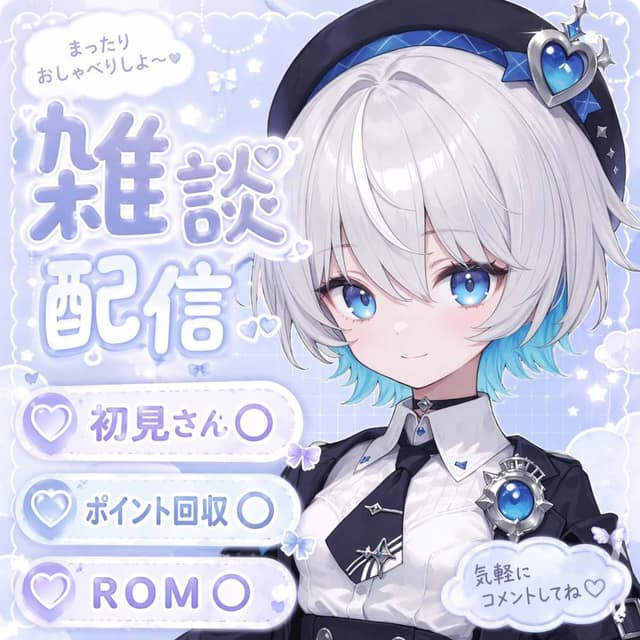
{ "type": "anime-style livestream thumbnail", "character": { "hair": "{argument name=\"hair color\" default=\"short silver hair with cyan underlights\"}", "eyes": "large bright blue", "outfit": "white collared shirt, black tie with silver accents, black jacket, black beret with a large blue heart jewel, blue jewel brooch, black choker", "pose": "smiling gently, looking at viewer, positioned on the right side" }, "background": "pastel blue with white clouds, sparkles, stars, small bows, and a subtle grid pattern", "typography_and_ui": { "top_left_speech_bubble": "まったりおしゃべりしよ〜♡", "main_title": { "text": "{argument name=\"main title\" default=\"雑談配信\"}", "style": "large, soft blue gradient, white outline, decorated with small hearts, positioned on the middle-left" }, "bottom_left_badges": { "count": 3, "style": "white pill-shaped buttons with a purple heart icon on the left", "labels": [ "{argument name=\"badge 1 text\" default=\"初見さん〇\"}", "{argument name=\"badge 2 text\" default=\"ポイント回収〇\"}", "{argument name=\"badge 3 text\" default=\"ROM〇\"}" ] }, "bottom_right_cloud_bubble": "気軽にコメントしてね♡" } }
常见问题
UI与界面案例适合什么模型?
这条提示词主要面向 GPT Image 2,也可按效果迁移到同类图像模型。完整提示词可在 craftprompt.vip 复制。
如何用「UI与界面案例」生成UI界面?
复制提示词 → 选择合适模型 → 在 craftprompt 生图工作台生成。